Sunday, 22 August 2010

How to simulate a large graphics tablet

For those that are thinking about upgrading their graphics tablet, yet are unsure about what size that would suit their needs best, there's a simple way of emulating the feeling of drawing on a larger tablet. If you already own a Wacom, the Mapping function, which comes with the tablet software, allows you to do this. By mapping your tablet to a smaller portion of your computer screen, it gives a similar effect as drawing on a section of a larger tablet. All that’s needed is a bit of maths.


  1. Tablet measurements. Find the dimensions of the Active Area of your current tablet and of the larger tablet that you want to simulate. This can usually be found in the spec sheets for the tablet.

  2. Resolution. Note down your screen resolution. (You can find your screen resolution by right-clicking on an empty area on the desktop, choose Properties and then Settings.)

  3. Mapped resolution. The resolution of the mapped area (in pixels) can be found simply through the ratio of the smaller tablet to the larger tablet.

    Mapped width in pixels = (Width of current tablet) / (Width of simulated tablet) x (Screen width in pixels)

    Just substitute Width for Height to find the mapped height in pixels.

    So for example, I have an Intuos3 A5 Wide (271 x 159 mm) and I'd like to simulate the Intuos4 XL (488 x 305 mm). My screen resolution is 1680 x 1050 pixels. By plugging in the numbers I find that the screen area that my A5 Wide should be mapped to is 932 x 547 pixels.

  4. Change Tablet Properties. Now, open up Wacom Tablet Properties and select the Mapping tab. Under Screen Area select Portion… and you’ll get a pop-up. In the Enter Coordinates field, put in the new dimensions. You can then choose what portion of the screen to use by moving the red box in the little screen diagram.

I used this method to compare the feeling of drawing on my current tablet, the Intuos3 A5 Wide, to drawing at the size of an Intuos4 Large and an Intuos4 XL tablet.
The Intuos4 Large is not that much bigger than an Intuos3 A5 Wide and as predicted, drawing at the Intuos4 Large size really didn't feel all that much different from the A5 Wide. The Intuos4 XL on the other hand is a different story.
These doodles were drawn at my screen resolution (1680 x 1050) with no zoom using the XL-mapping, L-mapping and no mapping respectively. It might not be obvious, but I felt much more in control of the lines with the XL-mapping. My hands did have to make larger movements which could be tiring in the long run, but you can always zoom out if you want less precision.


I've never found pencilling and sketching on the computer particularly enjoyable, probably because of the lack of control compared to sketching on paper. After having felt what it's like to draw on a much bigger tablet I think it might be worth investing in an upgrade though. It would be great to have the Free Transform tool and Cut & Paste functions at hand, and setting up perspective guides is ten times easier in Photoshop than on paper.

Friday, 9 July 2010

Ghost Hunter designs

These are some designs I did for a mock project called 'Ghost Hunter'. The project was a part of a concept art course run by Leo Sandberg at the University of Gotland last summer. Leo is an amazingly multifaceted artist and a great teacher. It was a privilege to be able to learn from him.


---
Leo Sandberg - Link
University of Gotland - Link

Thursday, 8 July 2010

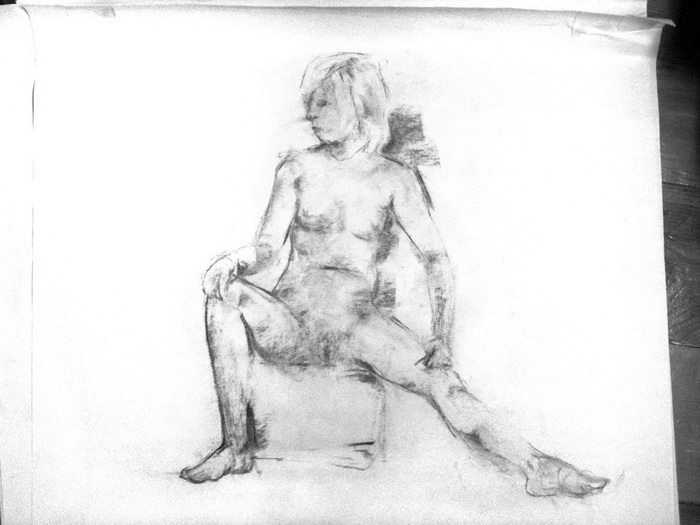
Recent Life drawings

It's been a while since I last did proper life drawing and it's hard to find classes in the summer, but I felt a strong need to get back into it so yesterday I splashed out on a slightly more expensive class than the ones I've been to in the past (previous post).

I've been trying to move away a little bit from the construction method à la Glen Vilppu. Vilppu's method is excellent for drawing figures from your mind and I'm still using it, but I think there's benefit in learning more approaches to drawing.
I need to give my mate John Aggs a great thanks for getting me Henry Yan's figure drawing book. Henry Yan has been a great source of inspiration for how to use charcoal, as has Nathan Fowkes.


My favourite from this session is probably this last one. It was one of the shorter poses, 5 mins, but I think enough information is suggested to make it readable and the pose ended before I could screw it up too much. When given longer time there's more of a risk for over-working the drawing.
I find it difficult to get the value relationships right. It's very easy to make something darker or lighter than it should be. I've heard that squinting is the trick but it's hard to see the right things.

Now that term is over it's become quite difficult to find cheap life drawing classes in Cambridge. The class I caught yesterday is run by Mark Rigby and it was unfortunately the last one for this summer. The next batch of classes start on the 8th of September. The class was held in St Barnabas Press on Coldham's Road. The building is a printing facility, mostly for artistic prints, and they also offer small studio spaces for artists.
These classes aren't cheap - £17 per session, but materials and easels are provided and the sessions are fairly long (3 hours, with a short coffee break). This particular class was not taught but Mark also teaches at the Hills Road Sixth Form College, and those classes are more structured.


---
Mark Rigby's Life drawing classes - Link
Hills Road Sixth Form College art & design classes - Link
St Barnabas Press - Link

Wednesday, 26 May 2010

London Expo & Dino-Saw-Us!

London Expo is upon us once again! I'll be there both days this weekend (29-30 May). I'm bringing copies of Twelfth Night which I'm happy to sign and sketch in, prints and a few very limited edition postcards made from the Chinese New Year and the Showgirl pics I drew a while back. Of course, I'll be doing commissions and portraits as well. 

Now, let me give a plug to Dino-saw-us, a super fun sticker collecting game that will be run at expo for the first time .
You play by simply picking up a blank passport booklet at Expo (or print one out yourself) and then you find all the people with stickers. I hope there's time for me to go sticker hunting as well... I really want some stickers... Gotta catch 'em all!!
Hopefully this will become a reoccurring Expo activity that will yield a different collection of stamps each time. I can see the passports becoming collectors' items, and it's a great way to make some new friends!
Find out more about how to participate and who's got stickers on the Dino-saw-us blog.


My stickers arrived today and they look great! I almost want to keep them to myself but I'll give them up if people come and say hi at our table!

I'll be sharing table C17 with Amanda in the Artist Alley. There are quite a few new names on the list so it will be fun to see this incarnation of the Artist Alley. Floor plan here:


Hope to see lots of people at Expo!

---------------
London Expo - Link
Dino-Saw-Us - Link
Previous post: Expo portraits - Link
Table buddy: Amanda Elanor Tribble - Link

Friday, 7 May 2010

Anna-conda

Found this sketch I did for one of Bobby Chiu's one-hour challenges last year. The theme was "serpent" I believe, but I didn't feel like going straight for the topic so I gave it a little twist.


Looking back at the challenges that I did for Bobby's live-streaming sessions, most of them seem to have gone in a humoristic direction. I don't normally do funny drawings, but Bobby's own whimsical artwork with a twist inspired me to think differently. I'm not a competitive person either, but challenges and competitions can push you in unexpected directions so it's worth going for it from time to time.

Topic: Cave man


Topic: Design your own Street Fighter character


Topic: Big and graceful


Topic: Creature cowboy


---
Bobby Chiu's Imaginism Studios - Link
Sketchoholic.com- Live streams, contests and interviews

Previous related posts:
Chiustream cave man
Girl sketch